Your countdown. Your music. Your machine.
A large seven-segment countdown, your own audio behind it, and nothing uploaded anywhere.
Open TickTune →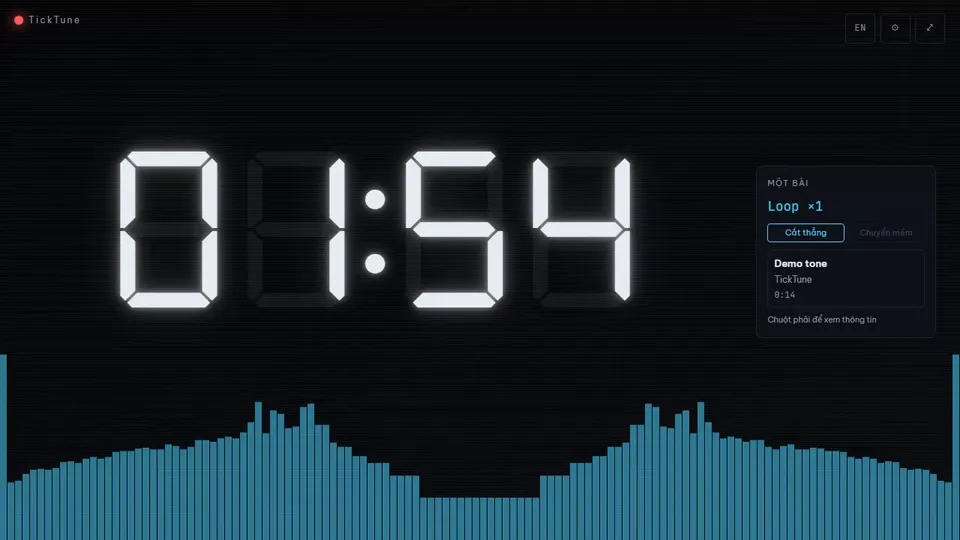
What it does
Runs entirely in your browser
Your files are read in memory for the session and never uploaded. There is no account and no server to send anything to.
Built to be looked at
A glowing seven-segment clock on a dark stage, with backgrounds, a visualizer and a tally light that keeps the beat.
Yours to keep
GPL-3.0, source in the open, no telemetry and no analytics. What you see is the whole thing.
Three ways to play
Single
One track, looped behind the countdown. The simplest way to start.
Playlist
A queue you can reorder by dragging or with Alt+↑/↓, with shuffle and repeat.
YouTube
Paste links and they play in YouTube’s own embedded player, which stays visible as their terms require.
A queue is either all local files or all links — the two do not mix.
Limits
| What | Limit |
|---|---|
| Single mode | one file, up to 10:02 |
| Playlist files | up to 95 files |
| Playlist per file | up to 10:02 each |
| Playlist total | up to 91:00 |
| YouTube links | up to 50 (no duration cap) |
| Countdown | 1 second to 24 hours |
Chosen so a session stays responsive, and enforced as you import.
Questions
Is the countdown accurate if I switch to another tab?
The countdown is accurate while the tab is visible. While it is in the background it is best-effort: the elapsed time is always computed correctly, but the browser may not let the app react until you come back. If it finishes while you are away, the Finished screen tells you when zero was actually reached rather than pretending it just happened.
Do my files get uploaded anywhere?
No. Local files are read inside your browser and held in memory for the session only. There is no upload endpoint, no analytics and no telemetry. Closing or reloading the tab clears the queue — the app warns you first.
Why does it not work on my phone?
TickTune is desktop-only by design. The layout is built around a large countdown with a side rail, and the audio and file handling assume a desktop browser. Phones and touch-only tablets see a short notice instead.
What happens with YouTube links?
They play in YouTube’s official embedded player, which stays visible at all times because their terms require it. TickTune never downloads, extracts or re-streams audio or video, and it cannot read the audio of a YouTube video — so the visualizer is unavailable in that mode.
Is anything stored on my machine?
Only your settings — language, background, countdown and playback preferences — plus the record that you accepted the terms. Your files, your queue and your links are never stored.
Is it really free?
Yes, and it is free software: GPL-3.0-only, with the source published. You can read it, run it, change it and share it under the same licence.